AI Coding Assistants in 2026: A Developer's Honest Assessment
After two years of daily use across multiple AI coding tools, here's a frank look at what they actually speed up, what they slow down, and what they've fundamentally changed about being a developer.
Jordan Park
Full-Stack Engineer
March 12, 2026
I’ve been using AI coding assistants heavily since late 2023. Copilot, Cursor, Claude, GPT-4, Gemini — I’ve had all of them open in different terminals and editors at various points. After two years and thousands of hours, I have strong opinions.
What They’re Actually Good At
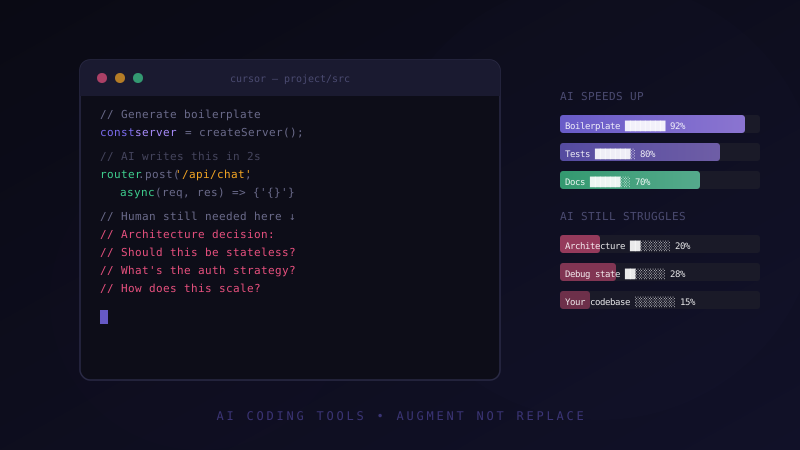
Boilerplate and scaffolding. This is where AI assistants shine brightest and most consistently. Setting up a new Next.js project with authentication, a Prisma schema, a tRPC router, CI/CD config — tasks that are well-defined but tedious. I’ve cut 3–4 hour bootstrapping sessions to 30 minutes.
Documentation and comments. I’ve started writing code first and asking AI to document it second. The documentation is consistently better than what I’d write, and it forces me to think about whether the code is actually readable.
Test generation. Give a function to an AI, ask for comprehensive unit tests. It covers edge cases I’d miss. Not infallible, but a strong first draft.
Language/framework translation. “Convert this Python code to TypeScript” or “port this React class component to hooks” — AI handles these translations reliably.
What They’re Surprisingly Bad At
Architectural decisions. Ask an AI how to architect a distributed system, and you’ll get a competent answer — but a generic one. It won’t know that you have a team of three, a budget for one EC2 instance, and a 6-week deadline. Context-dependent architecture requires human judgment.
Debugging complex state. Simple bugs, sure. But multi-layered state bugs — race conditions, complex interaction between reducers, distributed system issues — AI assistants tend to suggest plausible-sounding but wrong fixes. They pattern-match on error messages rather than actually tracing execution.
Your specific codebase. Unless you’re using a tool with good context management (Cursor with Rules is the best I’ve found), the model doesn’t know your conventions, your abstractions, or your team’s decisions. It’ll write technically correct code that violates your architecture.
What’s Changed About Being a Developer
The most significant shift isn’t productivity — it’s where I spend cognitive effort. I now spend less time on syntax and lookup, more time on design decisions and review. The ratio of thinking-to-typing has shifted dramatically.
This is mostly good. But there’s a risk: AI assistants are very good at generating plausible code quickly, and plausible code can fool you. I’ve caught myself accepting AI output without fully understanding it. That’s dangerous. You still need to own your code.
The “Junior Developer” Problem
I’m increasingly worried about developers who started using AI assistants early in their careers. They’re shipping features fast, but I’m not confident they’re developing the debugging intuition and architectural judgment that comes from struggling through problems without a safety net.
This isn’t a “kids these days” complaint — it’s a genuine pedagogical question. How do you build deep skills when you have a capable assistant that shortcuts the struggle?
My Current Stack
Cursor for in-editor suggestions and chat, Claude for complex reasoning and architecture discussions, and GitHub Actions with AI-powered code review for the PR pipeline. I’ve found that using the right tool for the right task matters more than picking the “best” one.
AI coding assistants are genuinely transformative. But they augment good judgment — they don’t replace it.